
|
Benbrian
in THE FINIX CLUB • 2 weeks, 3 days ago |
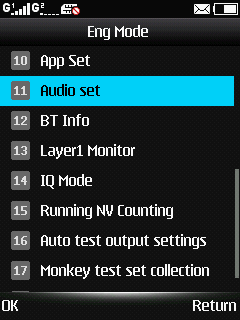
LeoChat users,wid da code i hav given for screenshot/*#9646633# on button phone,u can now upgrade ur java phone to support mp4 format if ur phone don't do so how? Follow my step here 1:-dial dat code & click the option audio set after dat it will apear 11options to select.2:-click option 4 dat is MP4HFTP after clicking,u will see Volume level & those Volume level u ar seeing,increase them all to 36 & again go back to audio set .3:-press this option MP4HFTR & clicking it u will see MIC VOLUME,those mic volume decrease them to 18 & press OK not return option.4:-go back to the main window of ur phone & switch ur phone off & again on.then download mp4 format & enjoY.meet me if u hav any question or help-----Thank u......
 51 views
 2
2
 Comments

 nice 1
