
Update: Leochat.online is Now bondhuu.com
Hey there guyz,do u know dat Opera mini 4.5 handler … - THE FINIX CLUB | Bondhuu

← Back to THE FINIX CLUB

Benbrian Benbrian
in THE FINIX CLUB • 4 weeks ago
Hey there guyz,do u know dat Opera mini 4.5 handler mod iz out ??? Download it now here http://hotophix.wapzim.com
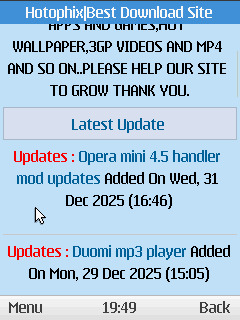
Post image

Views 47 views

Login or Register to react
Comments Comments 7
divx divx Verified
wow, when did this happen:clap: is this a mod in 2025??? Am i seeing double???

4 weeks ago  |  Reply

Benbrian Benbrian
Yes

4 weeks ago

divx divx Verified
Wow wow wow

4 weeks ago  |  Reply

Benbrian Benbrian
U download it?

4 weeks ago

divx divx Verified
yes na

4 weeks ago  |  Reply

Jiggy Jiggy
Abeg: How u take screen shot 4 small phone?

3 weeks, 6 days ago  |  Reply

abdomoneim199 abdomoneim199
Taking screenshots on a small phone is easiest with button combos or gestures that don't need much finger stretch. Most Android phones (common for smaller models) use the same methods, regardless of screen size. These work on devices from Frankfurt-area carriers too.[https://www.pcmag.com/how-to/take-a-screenshot-android-device][https://screenshotwhale.com/blog/how-to-take-a-screenshot-on-an-android]

✏️
Button Method
Press and hold Power (side) + Volume Down buttons together for 1 second, then release.
The screen flashes, and the shot saves to your gallery.
This is the standard for nearly all Androids, including small ones like Pixel or Samsung compacts.[https://www.youtube.com/watch?v=qrLiwhiG2No][https://www.youtube.com/watch?v=WjmvmcQScM0][https://www.pcmag.com/how-to/take-a-screenshot-android-device]

✏️
Gesture Options
⦁ Samsung (Palm Swipe): Swipe your hand edge across the screen (enable in Settings > Advanced features > Palm swipe to capture).[https://www.samsung.com/us/support/answer/ANS10002500/]
Google Pixel (Quick Tap): Double-tap the phone back (enable in Settings > System > Gestures > Quick Tap > Screenshot).[https://www.pcmag.com/how-to/take-a-screenshot-android-device]
No big reaches needed—great for tiny screens.[https://screenshotwhale.com/blog/how-to-take-a-screenshot-on-an-android]

✏️
App Alternatives
Use free apps like Screen Master or Screenshot Touch for floating buttons, shakes, or scrolls.
They add easy access without button presses, ideal if hardware is tricky on small phones.
https://www.androidauthority.com/best-screenshot-apps-android-883372/

3 days, 5 hours ago

Want to join the conversation?

Login Register
Logo
Login Register About Us Home
Help Terms & Policies Google Search